

Custom Plans API
Build, edit, and finalize a company-scoped custom plan programmatically.
A custom plan is a plan scoped to a single company, built for sales-led deals that are billed by invoice rather than self-service checkout. Most teams build these in the Schematic app, but the entire flow is available over the API, which is useful if you want to generate custom plans out of your CRM, a deal desk, or an internal admin tool.
The whole in-app builder collapses into one call. POST /custom-plan-bundles creates the plan, its billing product and base price, every entitlement, and any credit grants in a single request. Two more calls cover the rest of the lifecycle: one to edit the draft, one to finalize it and send the invoice.
This is an advanced, programmatic use case. These endpoints let you assemble pricing, entitlements, and billing terms in one request, which means a malformed payload can produce a plan that bills a customer incorrectly. Build and verify against a non-production environment before you point this at real companies.
We are happy to walk you through this. If you are planning a custom plan integration, reach out at support@schematichq.com or through your customer Slack channel and we will help you shape the payloads and review them before you go live.
Endpoints
All three require secret API key authentication. See Authentication.
Before you start
This example assumes USD. Every payload on this page sets "currency": "usd".
Prices are integers in cents. A $5,000 annual base price is 500000. A $50 per-seat price is 5000.
You need IDs before you can build a payload. Every entitlement references a feature_id, credit entitlements and grants reference a credit_id, and the plan itself references a company_id. See Finding the IDs you need.
If you are not sure how to express a particular pricing shape in the payload, build it once in the Schematic app and copy the configuration over. Anything you can construct in the UI can be expressed in the request body.
Create a custom plan
POST /custom-plan-bundles
This single call creates the plan, attaches it to one company, sets up its billing product and base price, creates every entitlement, and issues any recurring credit grants.
The example below creates a $5,000/year plan for one company with three entitlements and a monthly grant of 6,000 AI Tokens.
plan_id is a required field on each entitlement and credit grant, but the plan does not exist yet when you create it. Pass an empty string. Schematic fills in the real plan ID as it creates the records. When you edit an existing plan, pass the actual plan ID instead.
Field reference
Identity of the plan. company_id is the company this plan is scoped to, and it is what makes the plan a custom plan rather than a catalog plan. name and description are both required, though description may be an empty string. icon is an optional color name such as sky or emerald.
The base charge for the plan, separate from any per-unit pricing on individual entitlements. Set billing_strategy to schematic_managed to have Schematic create the product and price in Stripe for you. charge_type is recurring for a subscription, one_time for a single charge, or free for a plan with no base charge. Set the price using monthly_price, quarterly_price, yearly_price, or one_time_price in cents.
Omit this object entirely for a plan with no billing attached.
The entitlements to create on the plan, up to 100. Each element has an action of create and a req object describing the entitlement. See Entitlement examples for the shape of each pricing model.
Recurring credit grants issued to the company on this plan, up to 100. Each element has an action of create and a create_req object. See Credit grants.
Response
A 201 response returns the created plan, its first version, the billing product, and the fully resolved entitlements and credit grants.
Hold onto two IDs from this response. data.plan.id is what you pass to the edit endpoint, and data.plan_version.id is what you pass to the finalize endpoint. Note that the version comes back with a status of draft, so nothing is billed and the company is not yet on the plan.
Entitlement examples
Every entitlement needs a feature_id and a value_type. Monetized entitlements add a price_behavior and the prices that go with it. The models below map one to one onto the pricing models described in Usage Based Billing Models.
Prices can be set per interval using monthly_unit_price, quarterly_unit_price, and yearly_unit_price (integers, in cents), or their _decimal string equivalents when you need sub-cent precision.
value_type is not free-form once a price_behavior is set. Schematic derives it from the behavior, so sending a mismatched value gets corrected rather than honored:
There are also feature type restrictions. credit_burndown is only available on event-based features, tier on event-based and trait-based features, and license features can only be sold pay_in_advance.
Boolean access
Turn a feature on or off for the company.
Numeric limit
Grant a fixed quota with no charge attached.
Use value_type: "unlimited" for an uncapped entitlement, in which case no value field is needed.
Pay as you go
Charge for each unit consumed with no included quota. This example bills one cent per API call.
To cap consumption, switch value_type to numeric and add a value_numeric hard limit. Schematic turns the feature off once the company hits it.
Pay in advance
Charge up front for a committed quantity, the usual shape for seats. usage_quantity records the quantity the company is contractually committed to.
usage_quantity records the committed quantity, but it is not enforced and does not set the company’s quantity. The quantity actually billed comes from the company’s current trait value, so set that separately if you need the first invoice to reflect the committed number.
Fixed fee with overage
Include a quota in the base price and charge per unit beyond it. soft_limit is the included amount and the unit price is the overage rate. Below, the first 500 calls are included and each additional call costs one cent.
Add a hard limit by setting value_type to numeric and value_numeric to the ceiling. Overage is then charged between the soft limit and the hard limit, and the feature is turned off above it.
Volume and graduated pricing
Tiered pricing uses price_behavior: "tier" with a tier_mode of either volume or graduated, plus a tier list for the relevant interval. Each tier has an up_to boundary, and the final tier omits up_to to mean unbounded. flat_amount and per_unit_price are both in cents, and either may be omitted.
Switch tier_mode to graduated for graduated pricing. The tier list format is identical, only the way charges accumulate changes. See Volume pricing and Graduated pricing for how each one bills.
Credit burndown
Draw down a credit balance as the feature is used, rather than charging money per unit. value_credit_id is the credit to burn and credit_consumption_rate is how many credits one unit of usage costs. Rates can be fractional.
See Credit burndown for the full model.
Credit grants
Credit grants give the company a recurring balance to burn down. The grant below issues 6,000 AI Tokens that reset monthly, aligned to the company’s billing period.
The credit to grant. Create credits ahead of time via POST /billing/credits or in the app under Credits.
How many credits to issue each period.
How often the balance resets. One of daily, weekly, monthly, quarterly, every_6_months, or yearly.
What the reset is anchored to. billing_period aligns resets to the company’s subscription period, and first_of_month aligns them to the calendar.
plan_period resets the balance each period. no_reset issues the credits once and lets them accumulate.
The percentage of unused credits that carry into the next period, only applied when reset_type is plan_period. Rolled-over credits expire at the following reset and are not rolled again. Defaults to 0.
fixed grants the same amount regardless of company size. per_license multiplies the grant by the quantity of a license, and requires license_id. Defaults to fixed.
Whether the company can purchase additional credit bundles once the granted balance runs out.
Edit a draft custom plan
PUT /plan-bundles/{plan_bundle_id}
Use this to change a plan before it is finalized, which matters if you are building an interactive flow where a rep adjusts terms across several steps rather than assembling the whole plan at once.
The path parameter is the plan ID returned from the create call. Pass the plan version ID in the body so Schematic knows which draft version to modify.
The action field on each entitlement and credit grant is what drives the change:
create adds a new record, with the details in req (entitlements) or create_req (credit grants).
update modifies an existing record, and requires the entitlement_id or credit_grant_id alongside the changed fields.
delete removes an existing record, and needs only the entitlement_id or credit_grant_id.
This endpoint is not replace-style. Entitlements you leave out of the array are untouched, not removed. Send an explicit delete action to remove one. This is the opposite of the Manage Plan API, so it is worth being deliberate about which one you are calling.
Finalize and send the invoice
PUT /plans/version/{plan_version_id}/publish
Finalizing publishes the draft version, generates the invoice in Stripe, and puts the company on the plan according to the activation strategy you choose. This is where the billing terms of the deal are set.
The path parameter is the plan version ID (plnv_), not the plan ID. The SDKs name this argument plan_id, which is misleading. Pass data.plan_version.id from the create response.
Field reference
Where the invoice is sent. This is the billing contact at the customer, and it is the field most worth getting right, since it determines who actually receives the bill.
When the company gets access to the plan. See Activation strategies below.
Payment terms, expressed as a number of days. Net 7, Net 15, Net 30, and Net 60 are just 7, 15, 30, and 60. Any value up to 365 is accepted, so custom terms need no special handling.
What happens to the company already on the plan. immediate moves them onto this version right away, and leave keeps them on their current version. For custom plans, which only ever have one company, immediate is what you want.
Companies to hold back from the migration. Pass an empty array for a custom plan.
An optional Stripe coupon ID to discount the invoice. Omit it if the deal has no discount.
Whether Stripe emails the invoice when it is finalized. Defaults to true. Set it to false if you would rather deliver the invoice link yourself.
An optional billing address to set on the Stripe customer.
An optional billing phone number to set on the Stripe customer.
An optional tax ID to set on the Stripe customer, for customers who need it on the invoice.
Values for any custom checkout fields you have configured, each an { id, value } pair.
How to handle proration if the company is moving from an existing subscription. One of always_invoice or create_prorations.
Activation strategies
activation_strategy controls whether access depends on payment, and the two options suit different levels of trust in the customer.
Setting it to on_publish gives the company access immediately, before the invoice is paid. This is the “activate immediately” option in the app. If the customer does not pay within the payment terms, access is removed.
Setting it to on_payment holds the plan as pending until the invoice is paid. The company gets access only once payment clears.
Choose on_payment when you want payment secured before granting access, and on_publish when you want the customer working in the product while the invoice is outstanding.
What lands in Stripe
Finalizing creates a real invoice in Stripe for the company, and it will include the plan’s base price plus any pay-in-advance entitlement quantities the company holds. A plan with a $5,000 annual base price and one seat at $50/year produces a $5,050.00 invoice.
The invoice is created in the open state with a due date derived from days_until_due, and Stripe emails it to customer_email when send_invoice is true. You can find it under Invoices in the Stripe dashboard, where the billed-to address matches the email you sent. Stripe handles payment collection and dunning from there. When the invoice is paid, an on_payment plan becomes active.
Confirming the result
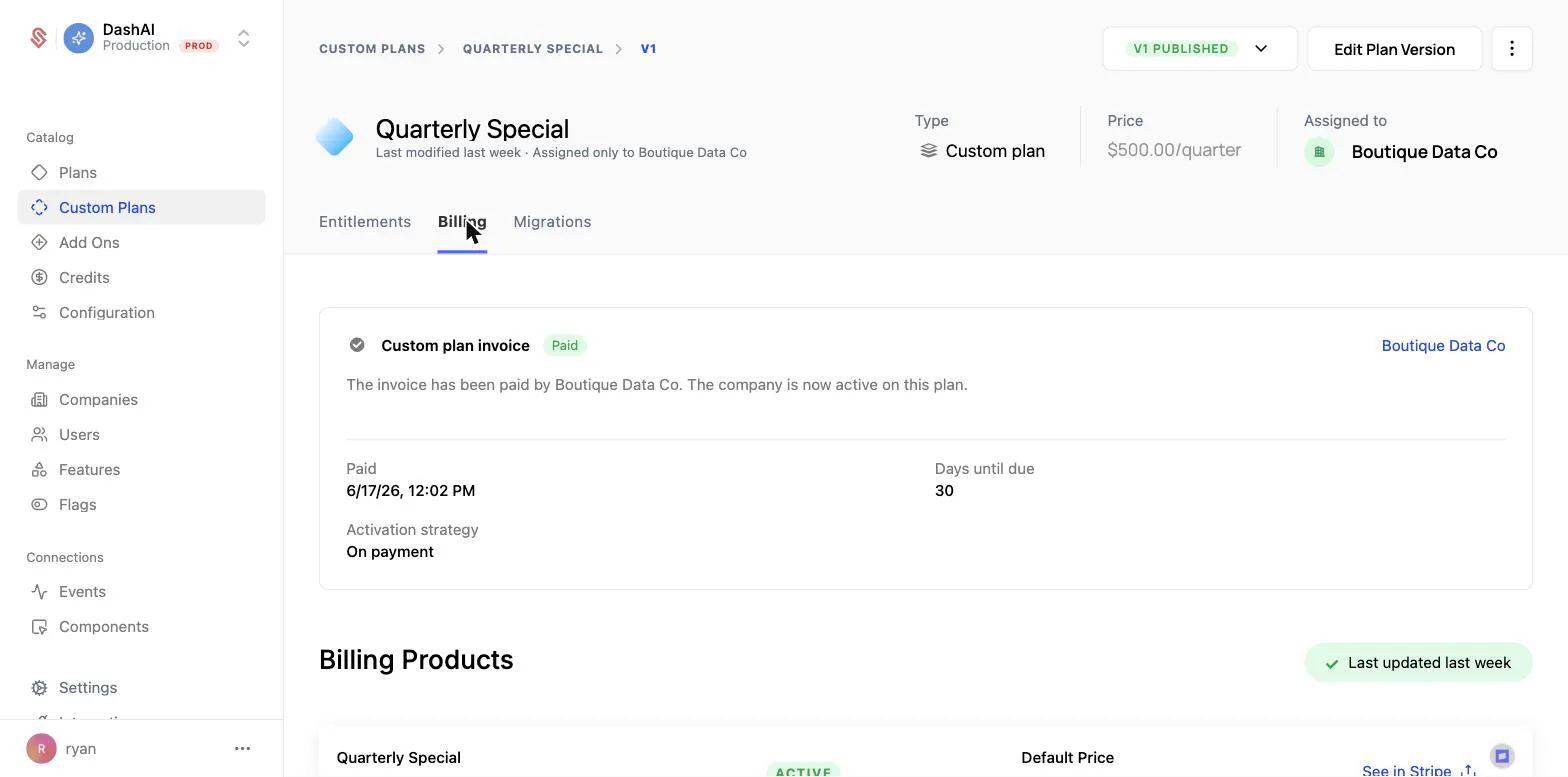
The plan’s Billing tab in the Schematic app reflects the state of the invoice, the activation strategy you chose, and the payment terms. It is a good way to sanity check a programmatic flow while you are building it.
Finding the IDs you need
An alternative starting point
If you want to create the plan shell first and add entitlements later, POST /custom-plans creates an empty custom plan from a company_id, name, and description. It also accepts copied_from_plan_id, which seeds the new plan with the entitlements of an existing catalog plan. That is the equivalent of Duplicate from plan in the app, and it is a useful base when most custom deals start from your standard Enterprise plan and diverge from there.
Learn more
- Custom Plans for how custom plans fit into the catalog
- Creating a Custom Plan for the in-app walkthrough
- Manage Plan API for assigning companies to standard catalog plans
- Usage Based Billing Models for the pricing models behind each
price_behavior - Credit burndown for how credit grants and consumption rates work