

Plan Manager
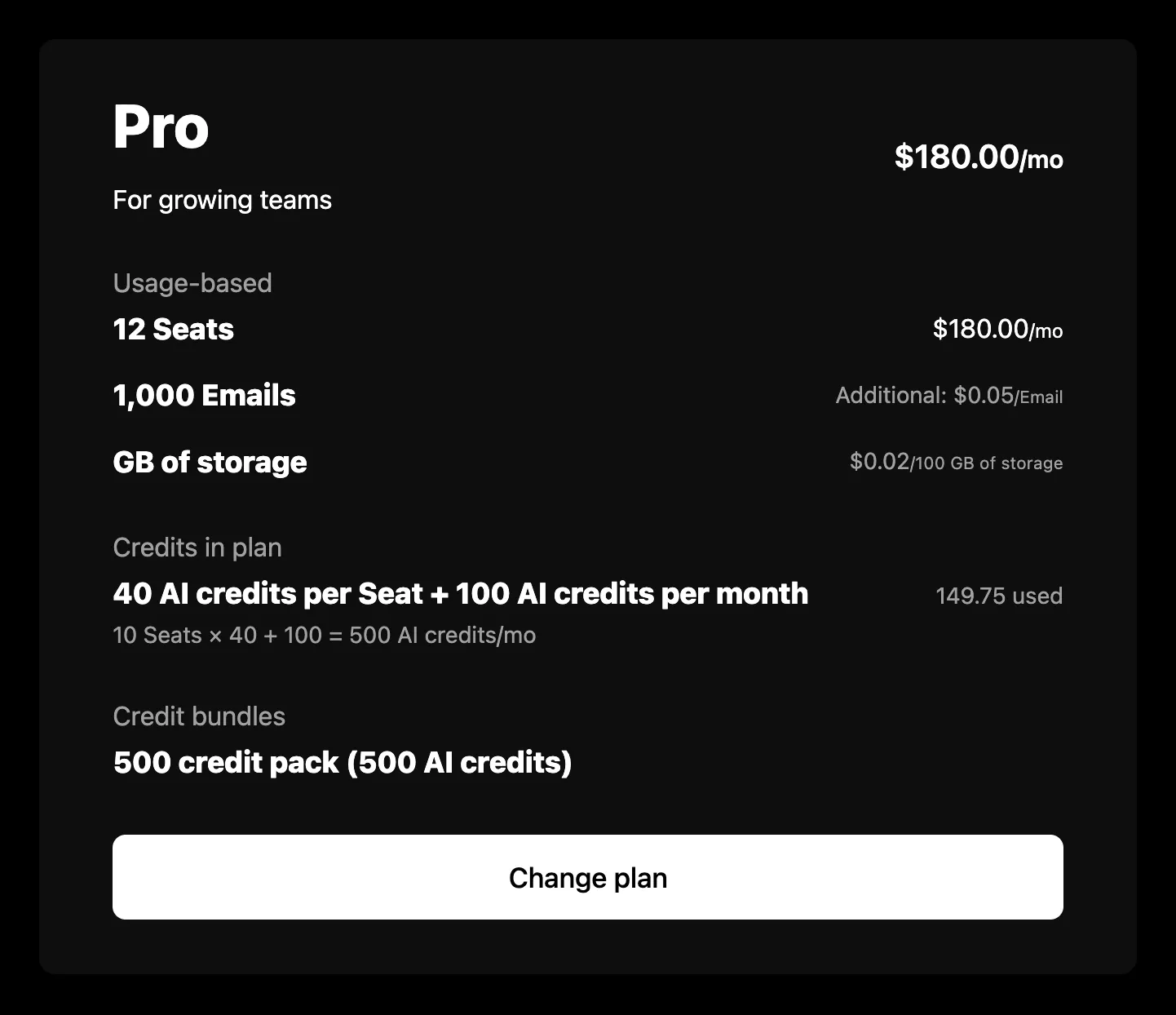
PlanManager renders the signed-in company’s plan: a notice about where its subscription is headed, the plan and its price, its add-ons, its usage-based features, and the credits the plan and the company’s purchases bring. It reads the company, its feature usage, and its credit balances from the company billing API, so it needs a session on the provider as described in the Drop-in components overview.
Usage
Props
Change plan and Edit
“Change plan” and the auto top-up “Edit” show only when you give them somewhere to go, with a handler or a URL. The component has no checkout of its own, so the button reaches whatever plan picker or purchase flow you point it at. “Change plan” also hides while a custom plan waits on payment to activate.
The card does not see what happens behind those buttons. When your handler changes the plan or the top-up settings without leaving the page, call the function useInvalidateBillingData returns once it finishes, and every loaded resource reloads.
Notices
At most one notice shows, in this order:
The notice carries its kind on data-kind: trial, canceled, customPlanBilling, or scheduledDowngrade.
The plan and its sections
The price reads per the subscription’s period, such as “$30.00/mo”. A free plan with usage-based features reads “Usage-based”, and a plan priced at zero reads “Free” only with showZeroPriceAsFree.
Under the plan, each section has a label you can hide with showLabels:
- Add-ons lists each held add-on at its price, per the plan’s period, or once for a one-time add-on.
- Usage-based lists each feature with a price behavior: its limit or the quantity paid for, its unit or package price, its credits per use, and what an allocation paid in advance costs. Tiered features carry a tooltip with every tier’s price.
- Credits in plan sums the plan’s grants of each credit, worded per license where the plan grants per license, with how much is used and, when the credit tops up automatically, an info tip with its threshold and top-up amount. When the plan lets the company top up its credits, an auto top-up box follows with each credit’s threshold and top-up amount, or that its auto top-up is disabled, and “Edit”.
- Top-ups, Credit bundles, and Promotional credits list the company’s auto top-up, purchased, and free grants, a row per bundle (or per grant outside one), newest first.
Each credit section shows three rows, then “See all” for the rest. showCredits={false} hides every credit section.
Errors
A failure with nothing to show replaces the content with a short message and a “Try again” button. A 404 reads “Your plan is not available for this account.”, because that status means the account is not enabled for the company billing endpoints. Every other failure, and a 404 under a plan already loaded, reads “There was a problem retrieving your plan.” A refetch that fails with the plan on screen is reported under it rather than replacing it. In development the component logs the underlying error to the console beside the copy.
Credits that fail to load cost only the credit sections. The rest of the card renders, and a “There was a problem retrieving your credits.” row with “Try again” stands in their place.
Strings
Every word the component renders resolves through strings on the component, then on the provider, then the provider’s translate, then English. See Localization for how the chain works. These are the component’s own keys:
The usage-based rows share usagePerUse, usageHardLimitLabel, usageHardLimit, usageTieredPricingLabel, usageTiersVolume, and usageTiersGraduated with the usage components. Prices and the per-license breakdown under a credit take the periodMonthShort, periodQuarterShort, and periodYearShort suffixes, and the credit lines name the full period with periodDay through periodYear.
Markup
This is what the component renders, for a host styling it without SchematicStyles. The notice sits above the card, inside the root. Styling and theming lists the shared classes.
While loading, the root carries data-state="pending" and aria-busy="true", with a visually hidden schematic-hidden loading label and a schematic-skeleton with a heading bar and two rows, each with a name and a price cell. On a failure with nothing to show, the root carries data-state="error" and holds a schematic-status row. Credits that fail to load render in place of the credit sections as their own <div class="schematic-element schematic-plan-manager__section">, carrying data-state="error" with a schematic-status row and “Try again”, then data-state="pending" with a skeleton while it retries.
Build it yourself
useCompany returns the plan, add-ons, subscription state, scheduled downgrade, and pending custom plan billing. With useFeatureUsage and useCreditBalances, derivePlanManager turns them into the notice, the plan and its price, the add-ons, the usage-based rows, and the credit sections.