WorkOS Integration

This is an implementation guide, not a native integration. Schematic does not offer a turnkey WorkOS connector. WorkOS still works with Schematic today through Schematic’s keys system: you bring the WorkOS organization and user IDs as keys, and everything else behaves normally. This page describes exactly what you would set up.

WorkOS is an authentication and directory provider. Because Schematic identifies companies and users by your own keys rather than by Schematic-generated IDs, you can use WorkOS as the source of truth for identity and layer Schematic entitlements, feature flags, and embeddable components on top of it without storing any Schematic IDs.

There are three pieces to a complete WorkOS implementation:

  1. Create companies and users in Schematic keyed by their WorkOS IDs. This happens either inline in your own signup/provisioning flow or from WorkOS webhooks. From then on you address those entities by their WorkOS IDs in every API/SDK call and usage event, so you never need to store or look up a Schematic ID.
  2. A one-time backfill from WorkOS into Schematic when you deploy, so existing organizations and users don’t have gaps.
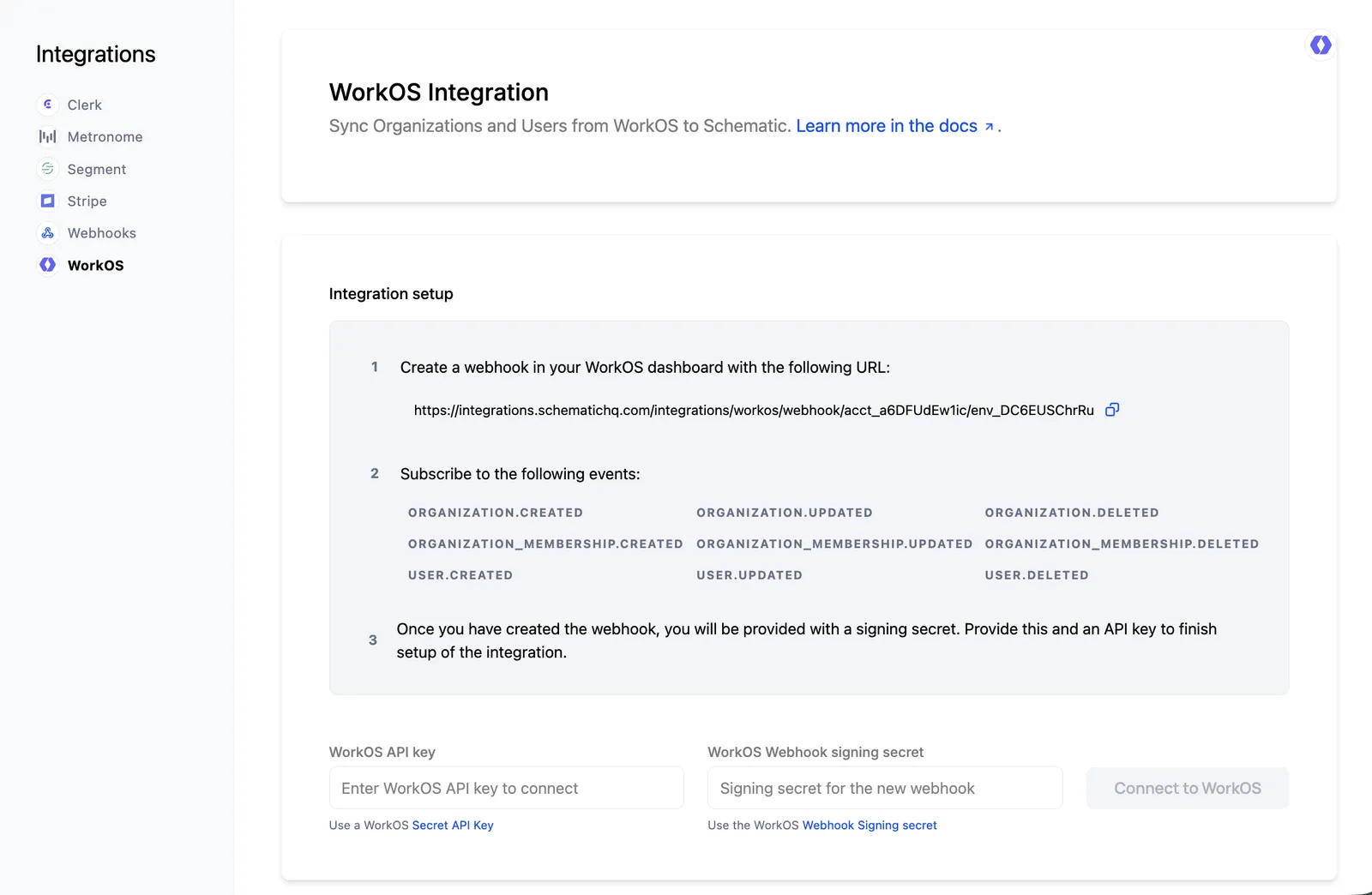
  3. Optionally (recommended), WorkOS webhooks to keep Schematic in sync as your user base changes over time. Not every WorkOS customer needs this; whether it’s worth it depends on how much your organizations and users churn.

How WorkOS maps to Schematic

WorkOS objectSchematic entityRecommended keys
Organization (org_...)Companyworkos_organization_id
User (user_...)Userworkos_user_id, email
Organization Membership (om_...)Sets the user’s parent companyn/a

A WorkOS Organization becomes a Schematic company, a WorkOS User becomes a Schematic user, and a WorkOS Organization Membership tells you which company a user belongs to. The WorkOS IDs are stable and globally unique, which makes them good primary keys. Review Key Management for background on how keys work.

This guide assumes you use WorkOS User Management (AuthKit): durable user_... users, org_... organizations, and om_... memberships. If you use WorkOS only for standalone SSO, each login gives you a profile rather than a persistent User Management user, so the user and membership webhooks and list endpoints below do not apply. In that case, upsert the company and user from your own callback using whatever stable identifiers you keep, and the rest of this guide works the same.

The key names workos_organization_id, workos_user_id, and email used throughout this guide are recommendations, not requirements. Schematic key names are arbitrary strings, so you can choose names that fit your own conventions. What matters is that you pick a name for each and use it consistently in every call. Storing more than one key per entity is encouraged: Schematic resolves between keys, so a user keyed by both workos_user_id and email can be addressed by whichever value you have on hand in a given context.

1. Create companies and users keyed by WorkOS IDs

When an organization or user is created in WorkOS, upsert the matching entity into Schematic and store the WorkOS IDs as keys. Because Schematic upserts are idempotent, the same call safely creates the entity the first time and updates it on every call after that.

1import { SchematicClient } from "@schematichq/schematic-typescript-node";
2
3const client = new SchematicClient({ apiKey: process.env.SCHEMATIC_API_KEY });
4
5// An organization signs up
6await client.companies.upsertCompany({
7 keys: { workos_organization_id: "org_EXAMPLE0123456789" },
8 name: "Acme Inc.",
9 traits: {
10 // Optional: carry over WorkOS context you want to target on
11 workosExternalId: "EXAMPLE_EXTERNAL_ID",
12 },
13});
14
15// A user signs up and joins that organization
16await client.companies.upsertUser({
17 keys: {
18 workos_user_id: "user_EXAMPLE0123456789",
19 email: "marcelina.davis@example.com",
20 },
21 name: "Marcelina Davis",
22 // `company` accepts the parent company's keys, so the user is
23 // associated with the right Schematic company
24 company: { workos_organization_id: "org_EXAMPLE0123456789" },
25});

This guide associates each user with a single company through the company field, which fits the common case of one user belonging to one organization. WorkOS users can belong to multiple organizations. If yours do, use the plural companies field instead and pass the user’s full set of organizations. Schematic treats companies as the exhaustive list, so it adds new memberships and removes any you leave out. The webhook handler in section 3 uses this exhaustive pattern.

Where to make these calls

WorkOS does not run arbitrary custom code for you after a signup. WorkOS Actions are synchronous allow/deny gates for authentication and registration, so they are the wrong tool for syncing to an external system. That leaves two practical places to make the Schematic upserts, and you can use either or both:

  • In your own signup/provisioning flow. Wherever your application already creates the organization or user, for example your AuthKit callback handler or the code that provisions a tenant in your database, add the Schematic upsert immediately after. This is something you wire into your own code. It has the lowest latency and keeps creation in your control.
  • From WorkOS webhooks. Subscribe to organization.created, user.created, and organization_membership.created and do the upserts in the webhook handler. This is the same handler used for ongoing sync in section 3, so if you handle those events, signup creation is already covered and you may not need any inline calls at all.

Many teams route everything through webhooks so there is a single sync path for creation, updates, and deletes. Wiring the upserts into your provisioning flow is a good choice when you want the company or user to exist in Schematic before the user’s first request completes.

Use the WorkOS IDs in every subsequent call

Once the WorkOS IDs are stored as keys, you address companies and users by those same IDs everywhere. You never store a Schematic ID.

Checking a feature flag or entitlement:

1const isOn = await client.checkFlag(
2 {
3 company: { workos_organization_id: "org_EXAMPLE0123456789" },
4 user: { workos_user_id: "user_EXAMPLE0123456789" },
5 },
6 "your-feature-flag",
7);

Tracking usage of a metered feature:

1await client.track({
2 event: "api-request",
3 company: { workos_organization_id: "org_EXAMPLE0123456789" },
4 user: { workos_user_id: "user_EXAMPLE0123456789" },
5});

The same WorkOS IDs work for identify events, trait updates, usage retrieval, and embeddable components, which become aware of the logged-in WorkOS user automatically.

2. One-time backfill when you deploy

Creating entities going forward only covers organizations and users created after you ship. To avoid gaps for everyone who already exists in WorkOS, run a one-time backfill that pages through WorkOS and upserts each organization, user, and membership into Schematic using the same keys.

WorkOS list endpoints are cursor-paginated: pass limit (up to 100) and follow the after cursor from listMetadata until it is empty.

1import { WorkOS } from "@workos-inc/node";
2import { SchematicClient } from "@schematichq/schematic-typescript-node";
3
4const workos = new WorkOS(process.env.WORKOS_API_KEY);
5const client = new SchematicClient({ apiKey: process.env.SCHEMATIC_API_KEY });
6
7// 1. Backfill organizations -> Schematic companies
8const organizationIds: string[] = [];
9let after: string | undefined;
10do {
11 const page = await workos.organizations.listOrganizations({ limit: 100, after });
12 for (const org of page.data) {
13 organizationIds.push(org.id);
14 await client.companies.upsertCompany({
15 keys: { workos_organization_id: org.id },
16 name: org.name,
17 });
18 }
19 after = page.listMetadata.after ?? undefined;
20} while (after);
21
22// 2. Backfill users -> Schematic users
23after = undefined;
24do {
25 const page = await workos.userManagement.listUsers({ limit: 100, after });
26 for (const user of page.data) {
27 await client.companies.upsertUser({
28 keys: { workos_user_id: user.id, email: user.email },
29 name: `${user.firstName ?? ""} ${user.lastName ?? ""}`.trim(),
30 });
31 }
32 after = page.listMetadata.after ?? undefined;
33} while (after);
34
35// 3. Backfill memberships so each user is tied to the right company.
36// Page through every organization collected in step 1. Because `company`
37// adds the user to that company without removing others, a user who belongs
38// to multiple organizations accumulates all of them across the loop.
39for (const organizationId of organizationIds) {
40 after = undefined;
41 do {
42 const page = await workos.userManagement.listOrganizationMemberships({
43 organizationId,
44 limit: 100,
45 after,
46 });
47 for (const membership of page.data) {
48 await client.companies.upsertUser({
49 keys: { workos_user_id: membership.userId },
50 company: { workos_organization_id: membership.organizationId },
51 });
52 }
53 after = page.listMetadata.after ?? undefined;
54 } while (after);
55}

Because upserts are idempotent and matched on keys, the backfill is safe to re-run. If a company or user already exists with a matching workos_organization_id or workos_user_id, the record is updated rather than duplicated.

The backfill is a point-in-time snapshot, and creating entities only covers new ones. WorkOS webhooks close the gap for everything that changes afterward: profile and name updates, users moving between organizations, and deletions. Not every WorkOS customer wires this up. If your organizations and users rarely change, the backfill plus signup-time creation may be enough. If your user base churns meaningfully, webhooks keep Schematic accurate without manual cleanup.

Subscribe to the relevant events

In the WorkOS Dashboard, create a webhook endpoint pointing at a public HTTPS URL in your application and subscribe to the events you care about:

  • user.created, user.updated, user.deleted
  • organization.created, organization.updated, organization.deleted
  • organization_membership.created, organization_membership.updated, organization_membership.deleted

Verify and handle each event

WorkOS signs every webhook request with a WorkOS-Signature header. The WorkOS Node SDK verifies the signature and constructs the event for you with workos.webhooks.constructEvent. Always verify before acting on a payload, then translate the WorkOS event into the matching Schematic upsert or delete keyed by the WorkOS ID.

1import { WorkOS } from "@workos-inc/node";
2import { SchematicClient } from "@schematichq/schematic-typescript-node";
3import express from "express";
4
5const app = express();
6const workos = new WorkOS(process.env.WORKOS_API_KEY);
7const schematic = new SchematicClient({ apiKey: process.env.SCHEMATIC_API_KEY });
8
9// Use express.raw, not express.json. constructEvent verifies the signature
10// against the exact bytes WorkOS sent, so it needs the raw body. Handing it a
11// parsed-then-re-serialized object can fail verification if the JSON differs.
12app.post("/webhooks/workos", express.raw({ type: "application/json" }), async (req, res) => {
13 let event;
14 try {
15 event = await workos.webhooks.constructEvent({
16 payload: req.body,
17 sigHeader: req.headers["workos-signature"],
18 secret: process.env.WORKOS_WEBHOOK_SECRET,
19 });
20 } catch {
21 return res.status(400).send("Invalid signature");
22 }
23
24 // The event type is on `event.event`, not `event.type`.
25 const { event: type, data } = event;
26 try {
27 switch (type) {
28 case "organization.created":
29 case "organization.updated":
30 await schematic.companies.upsertCompany({
31 keys: { workos_organization_id: data.id },
32 name: data.name,
33 });
34 break;
35
36 case "organization.deleted":
37 await schematic.companies.deleteCompanyByKeys({
38 keys: { workos_organization_id: data.id },
39 });
40 break;
41
42 case "user.created":
43 case "user.updated":
44 await schematic.companies.upsertUser({
45 keys: { workos_user_id: data.id, email: data.email },
46 name: `${data.firstName ?? ""} ${data.lastName ?? ""}`.trim(),
47 });
48 break;
49
50 case "user.deleted":
51 await schematic.companies.deleteUserByKeys({
52 keys: { workos_user_id: data.id },
53 });
54 break;
55
56 case "organization_membership.created":
57 case "organization_membership.updated":
58 case "organization_membership.deleted": {
59 // Re-derive the user's current organizations and write them as the
60 // exhaustive `companies` list. This reflects both additions and
61 // removals: a deleted membership drops that company, and a user left
62 // with none is cleared (companies: []).
63 const memberships = await workos.userManagement.listOrganizationMemberships({
64 userId: data.userId,
65 limit: 100,
66 });
67 await schematic.companies.upsertUser({
68 keys: { workos_user_id: data.userId },
69 companies: memberships.data.map((m) => ({
70 workos_organization_id: m.organizationId,
71 })),
72 });
73 break;
74 }
75 }
76 } catch (err) {
77 // Return a non-2xx so WorkOS retries the delivery.
78 console.error("Schematic sync failed", err);
79 return res.status(500).send("Sync failed");
80 }
81
82 res.status(200).send("OK");
83});

WorkOS retries on non-2xx responses or timeouts. The handler above does the Schematic work first and returns 200 only once it succeeds, so a transient failure returns 500 and WorkOS retries it. Keep the work fast and idempotent. If processing is heavy, enqueue the verified event, return 2xx immediately, and do the Schematic work from the queue with its own retries instead. Logging the WorkOS event id lets you safely skip duplicates.