

Handling customer exceptions and feature trials
What are examples of customer exceptions?
In many scenarios customers might need features that don’t come standard in a pre-baked package. That’s often handled through one off flags in application code, and eventually leads to a mess to maintain over time. Some examples when you might need to apply custom configuration for a specific customer:
- A sales-led deal that doesn’t fit perfectly into the good-better-best packages that are on your pricing page
- Feature trials
- Testing
In Schematic, we call these “Company Overrides”, and they can be applied individually to any company, or programmatically via our API. We’ll cover both scenarios below.
Override or custom plan?
An override and a custom plan both give one company something its tier does not, so it is worth knowing which one a deal calls for before you start building. Pick based on how much of the deal differs from your catalog.
Staying on a standard plan buys the customer something concrete. When you publish a new version of that plan, they get it. A company on a custom plan versions on its own track, so you update them separately from the rest of your catalog.
Applying an override in the Schematic UI
- Navigate to a company profile.
- Click add override and choose a feature.
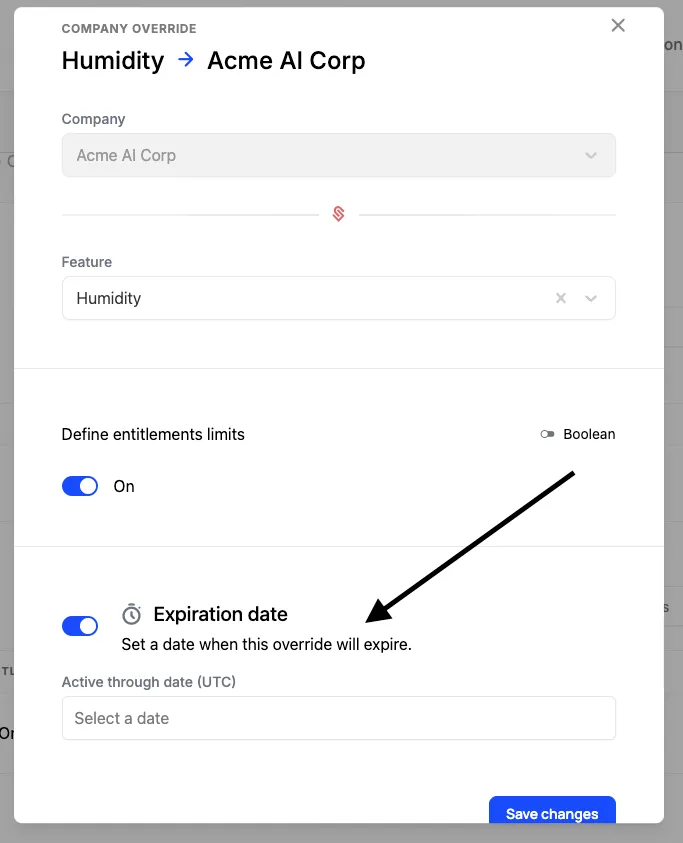
Time-limited overrides
While creating an override in the UI, you can also set an expiration date. This is useful for allowing a customer to try a feature for a limited time, often as part of a presale or upgrade motion. Additionally, this can help ease the burden of a pricing migration in which a customer may be losing access to a feature they previously had.
Applying an override programmatically
In situations where you may allow the user to enable an individual feature themselves in your application (e.g. trying a specific within their account) or otherwise manage exceptions outside of Schematic (e.g. in Hubspot or your own admin layer), you can use our API to apply the override by using the /company-overrides endpoint.
Here’s an example:
Once the override is applied via the API, it will also appear in the UI and can be managed within Schematic like other overrides.
Most Generous Policy
In the case that an override provides less quota than a plan entitlement, users will receive the more generous amount.
For example, if a company has a plan entitlement of 1000 API calls, and an override of 500 API calls, the company will receive 1000 API calls.