

Pricing Table
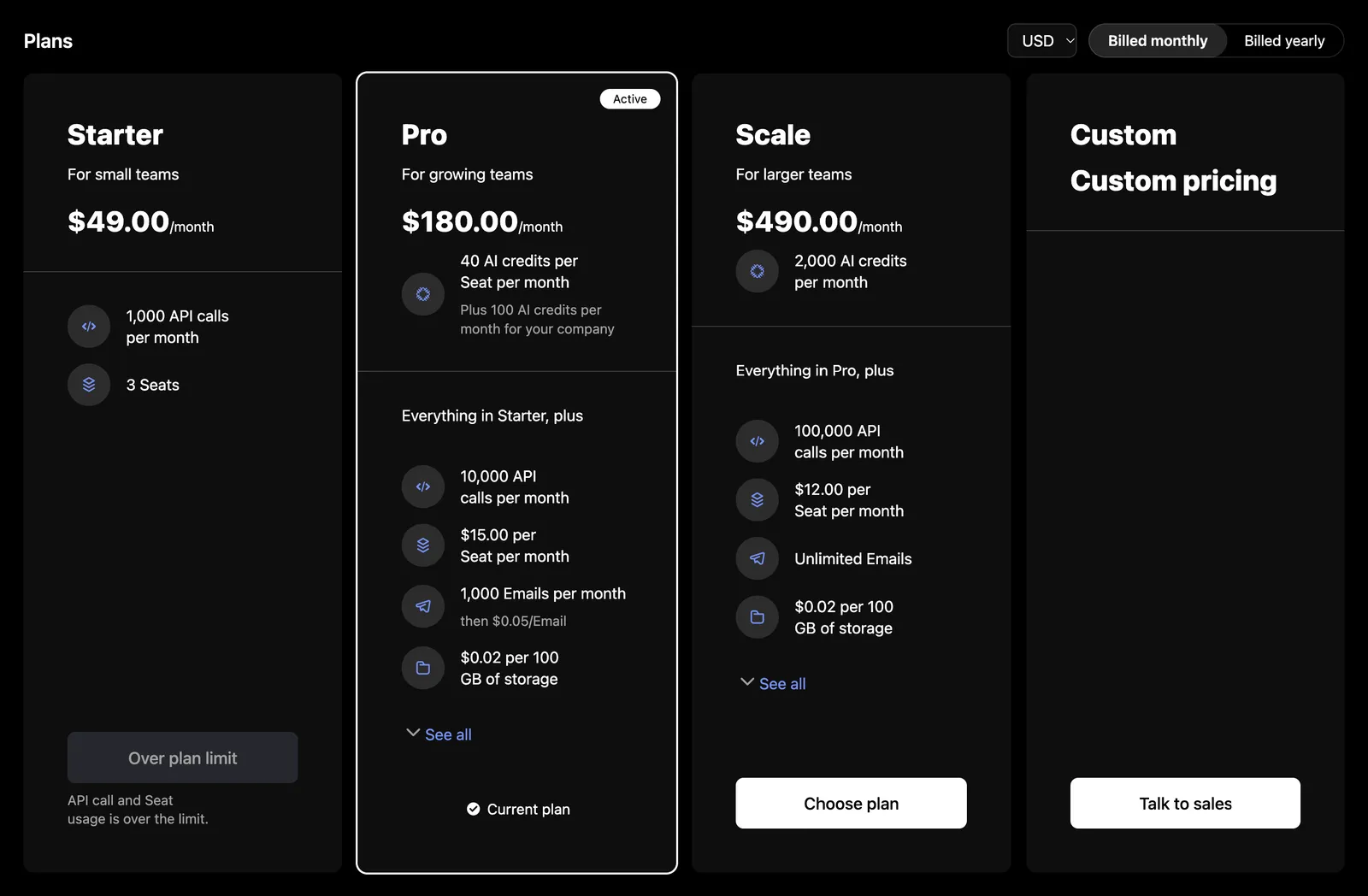
Plans and add-ons with a period toggle, a currency picker, included credits, and entitlement summaries. On a page nobody has signed in to it needs only your publishable key. Signed in, it marks the company’s current plan and holds back the plans the company cannot move to. The table opens nothing itself: each card’s action calls onSelectPlan, which can open Checkout or send a visitor to sign up.
Usage
Public page
In the portal
Props
onSelectPlan receives the card the reader chose, priced as it was shown:
checkout is the selection Checkout starts from: the plan with its period and currency, or the company’s add-ons with this one added, removed or kept. priceId and trialDays describe the card; the checkout prices the cart itself and offers the trial when the company can take it.
Without onSelectPlan, callToActionUrl makes each action a link; without either, cards have no action apart from the custom plan and blocked downgrades. The custom plan links to the catalog’s own URL. A blocked downgrade links to the account’s URL, else to callToActionUrl, else shows its text on a disabled button. Each card shows four features before “See all”. A plan’s included credits read a line per credit, such as “10 AI credits per Seat per month”, and a credit the plan also grants the company outright adds that share beneath it: “Plus 100 AI credits per month for your company”. When onSelectPlan opens a checkout that changes the plan without leaving the page, call the function useInvalidateBillingData returns once it is done, and the table reloads with the new current plan.
Public and company modes
The table reads the catalog through useCatalog, which follows the session on the provider. With no session, or before your auth resolves, it reads the public catalog with the provider’s publishable key: plans, add-ons, and prices, with no customer data, and every plan’s action is “Choose plan” and every add-on’s “Choose add-on”. Once a session starts it swaps to the company’s view of the same catalog, which says which plan is current and which changes the purchase rules allow.
In company mode the table also reads the company, for the period its subscription bills in: the table opens on that period, and the current plan is marked current only in it. A company that fails to load costs only that. Each card’s action follows the company’s standing:
In either mode, a card with prices but none in the selected currency is left out, and a recurring one with none in the selected period. The period toggle offers only the periods the catalog prices, months before quarters before years, and a one-time add-on is priced once.
With nothing to show, the table replaces the content with a message and “Try again”: a 404 reads “Plans are not available for this account.”, because that status means the account is not enabled for catalogs or catalogId names no catalog of the account’s, and every other failure reads “Plans could not be loaded.” A refetch that fails with plans on screen is reported under them as “Plans could not be loaded.”
Server-rendered, prefetch with fetchBillingData(client, { names: billingResources(PricingTable) }), adding catalog: { catalogId } when the table sets catalogId so the seed matches the catalog it asks for. A resource the client cannot read, the company’s view with no session or the public catalog with no key, is left out rather than failing the page.
Markup
This is what the component renders, for a host styling it without SchematicStyles. Styling and theming lists the shared classes.
Every other card ends in a schematic-plan-card__action holding a schematic-cta button, or a link with callToActionUrl; a downgrade or a change of add-on adds schematic-cta--outline, and removing an add-on adds schematic-cta--ghost. Under “Over plan limit” a schematic-plan-card__violations line names the features, as in “API calls and Seats usage is over the limit.” Each entitlement is a schematic-plan-card__feature like the credit’s, with its price detail in schematic-plan-card__detail and, with showFeatureDescriptions, its description in schematic-plan-card__feature-description. An icon that is not a schematic-icons glyph name, such as an emoji, renders as text inside <i class="schematic-icon schematic-plan-card__icon">. While loading, the root carries data-state="pending" and aria-busy="true" with a schematic-skeleton; on a failure with nothing to show, data-state="error" and a schematic-status row.
Localizing it
The table’s copy is under pricingTable*: pricingTableLoading, pricingTablePlans, pricingTableAddOns, pricingTableCurrency, pricingTablePeriod, pricingTableBilledMonthly, pricingTableBilledQuarterly, pricingTableBilledYearly, pricingTableSaveQuarterly, pricingTableSaveYearly, pricingTableSavingQuarterly, pricingTableSavingYearly, pricingTableChoosePlan, pricingTableChooseAddOn, pricingTableChangeAddOn, pricingTableRemoveAddOn, pricingTableCurrentPlan, pricingTableOverLimit, pricingTableOverLimitDetail, pricingTableTalkToSupport, pricingTableActive, pricingTableTrialLeft, pricingTableUsageBased, pricingTableFree, pricingTableCustomPlan, pricingTableCustomPrice, pricingTableEverythingIn, pricingTableSeeAll, pricingTableHideAll, pricingTableCredits, pricingTableCreditsPerPeriod, pricingTableCreditsPerLicense, pricingTableCreditsPerLicensePerPeriod, pricingTableCreditsPlus, pricingTableCreditsPlusPerPeriod, pricingTableUnitsPerPeriod, pricingTablePerUnitPerPeriod, pricingTablePerPackagePerPeriod, pricingTablePerUse, pricingTableUpTo, pricingTableUpToPerPeriod, pricingTableTierBased, pricingTableThen, pricingTableError, and pricingTableUnavailable. It shares usageUnits, usagePerUnit, usagePerPackage, usageUnlimited, and the tier and hard-limit tips with the usage components, the period names periodDay through periodYear, the suffixes periodMonthShort, periodQuarterShort, and periodYearShort, and retry. See Localization for how the chain works.
Build it yourself
useCatalog returns the catalog in either mode, tagged with its source. derivePricingTable takes your period and currency selection, and the company when signed in, and returns the periods and currencies on offer, a card per plan and add-on with its price and action, and the custom plan. The pricing page recipe puts them together.