Skip to navigation

Included Features

IncludedFeatures renders every feature the signed-in company is entitled to: what it gets, what it has used, and, for a priced feature, what that costs. The card loads from the company billing API, so it needs a session on the provider as described in the Drop-in components overview.
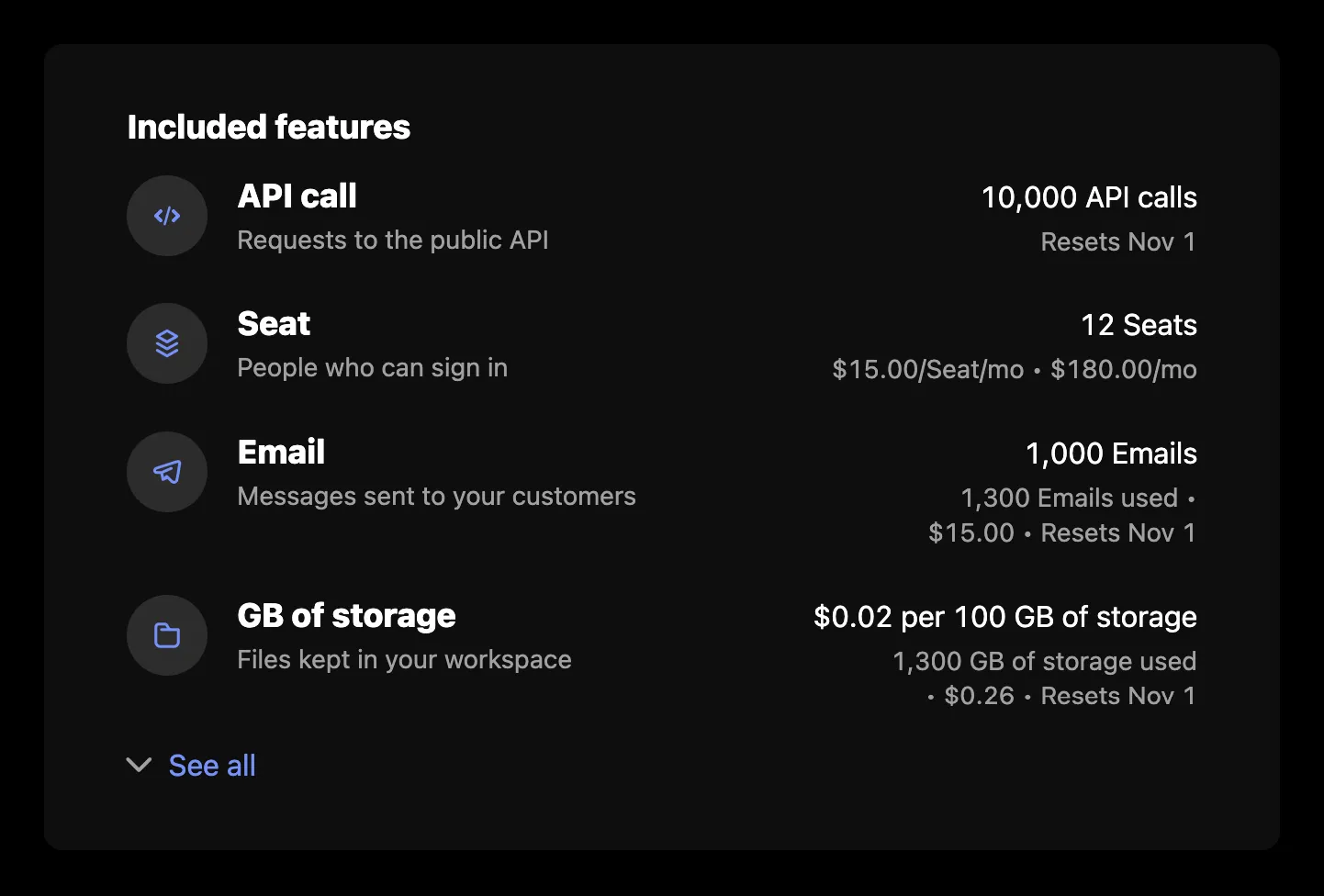
Included features

Usage

import { SchematicProvider } from "@schematichq/schematic-react";
import {
IncludedFeatures,
SchematicStyles,
} from "@schematichq/schematic-components/elements";
<SchematicProvider publishableKey={publishableKey} session={session}>
<SchematicStyles />
<IncludedFeatures visibleFeatures={["feat_api", "feat_seats"]} showHardLimit />
</SchematicProvider>;

Props

PropDefaultEffect
showHeadertrueThe “Included features” heading.
showIcontrueEach feature’s icon, where it has one.
showDescriptiontrueEach feature’s description.
showExpirationtrueWhen a company override ends.
showEntitlementtrueWhat the company gets: its allocation, price, or tier.
showUsagetrueWhat it has used, what that costs, and when it resets.
visibleFeaturesFeature ids to show, in this order. Every feature shows when it is absent.
showCreditstrueThe “credits per use” line on credit-burning features.
showHardLimitfalseAn info tip with the hard limit on features billed past it.
showWarningThresholdAsLimitfalseThe warning threshold in place of the limit, where one is set.
headingLevel2The heading’s level, 1 through 6, so the card fits your page’s outline.
classNameAdded to the root alongside schematic-element schematic-card schematic-included-features.
localeBCP 47 tag for number, currency, and date formatting. Falls back to the provider’s locale, then the viewer’s language.
stringsCopy for this card by key. Wins over the provider’s strings and translate.

The first four features show, with “See all” for the rest. A company entitled to nothing gets the heading over an empty list; leave the component off the page if you would rather show nothing.

How each row reads

Every row names the feature, with its description under it. A license feature adds a line for each per-license credit grant, such as “Includes 10 AI credits per Seat”, and a company override adds when it expires.

Boolean and license features stop there. Event- and trait-based features add what the company gets on the right, by price behavior:

Price behaviorEntitlementUsage beneath it
NoneThe limit, such as “2,000 API calls”, or “Unlimited API calls”When usage resets; without a reset date, “1,300 of 2,000 used” or “1,300 used”
Pay in advanceThe quantity bought, such as “12 Seats”The unit price per period, what it costs, and when it resets
Pay as you goThe unit or package price, such as “$0.01 per API call”What is used, what it has cost, and when it resets
OverageThe included amountWhat is used, what it has cost, and when it resets
TieredThe current tier, such as “Up to 1,000 API calls in this tier”What is used, what it costs, and when it resets, with a tooltip listing every tier’s price
Credit burnThe credits each use costs, unless showCredits is offWhat is used, what it has cost, and when it resets

The usage segments join with a bullet, as in “1,300 API calls used • Resets Oct 1”. A pay-in-advance feature with a tiered price reads like a tiered one beneath its quantity.

Errors

A failure with nothing to show replaces the card’s content with a short message and a “Try again” button. A 404 reads “Features are not available for this account.”, because that status means the account is not enabled for the company billing endpoints. Every other failure, and a 404 under rows already loaded, reads “There was a problem retrieving your features.” A refetch that fails with rows on screen is reported under them rather than replacing them. In development the component logs the underlying error to the console beside the copy.

Strings

Every word the card renders resolves through strings on the component, then on the provider, then the provider’s translate, then English. See Localization for how the chain works. These are the card’s own keys:

KeyDefault
includedFeaturesHeaderIncluded features
includedFeaturesLoadingLoading features, read by assistive technology while the skeleton shows
includedFeaturesErrorThere was a problem retrieving your features.
includedFeaturesUnavailableFeatures are not available for this account.
includedFeaturesSeeAll, includedFeaturesHideAllSee all, Hide all
includedFeaturesExpiresExpires {{date}}
includedFeaturesPerLicenseIncludes {{amount}} {{creditName}} per {{licenseName}}
retryTry again

The usage lines use these keys, shared in part with Metered Features, Plan Manager, and Pricing Table, so renaming one renames it wherever it appears:

KeyDefault
usageUnits{{amount}} {{units}}
usagePerUnit, usagePerPackage{{cost}} per {{unit}}, {{cost}} per {{size}} {{units}}
usageTierUpTo, usageTierUnlimitedUp to {{amount}} {{feature}} in this tier, Unlimited {{feature}} in this tier
usagePerUse{{amount}} {{units}} per use
usageUnlimitedUnlimited {{item}}
usageUnitPricePerPeriod, usagePackagePricePerPeriod{{cost}}/{{unit}}/{{period}}, {{cost}}/{{size}} {{units}}/{{period}}
usageUsed{{amount}} {{units}} used
usageResetsResets {{date}}
usageLimited, usageUnlimitedUsed{{amount}} of {{allocation}} used, {{amount}} used
usageHardLimitLabel, usageHardLimitLimit, Up to a limit of {{amount}} {{units}}
usageTieredPricingLabelTiered pricing
usageTiersVolume, usageTiersGraduatedPrice by unit based on final tier reached., Tiers apply progressively as quantity increases.
periodMonthShort, periodQuarterShort, periodYearShortmo, qtr, yr

Markup

This is what the component renders, for a host styling it without SchematicStyles. The root’s class list is the same in every state, and data-state tells them apart. Styling and theming lists the shared classes.

<div class="schematic-element schematic-card schematic-included-features" data-state="ready">
<div class="schematic-header">
<h2 class="schematic-header__title">Included features</h2>
</div>
<ul class="schematic-included-features__list">
<li class="schematic-included-features__row">
<!-- a feature with an icon -->
<i class="schematic-icon schematic-icon--… schematic-included-features__icon" aria-hidden="true"></i>
<div class="schematic-included-features__details">
<span class="schematic-included-features__name">API calls</span>
<!-- the description and per-license credit lines -->
<span class="schematic-muted schematic-small">…</span>
<!-- an override's expiry -->
<em class="schematic-muted schematic-small">Expires Oct 1, 2026</em>
</div>
<!-- event- and trait-based features -->
<div class="schematic-included-features__usage">
<span class="schematic-included-features__entitlement">2,000 API calls</span>
<span class="schematic-muted schematic-small schematic-included-features__used">1,300 API calls used • Resets Oct 1</span>
</div>
</li>
</ul>
<!-- more than four features -->
<button class="schematic-link-button schematic-included-features__toggle" aria-expanded="false">
<i class="schematic-icon schematic-icon--chevron-down schematic-chevron" aria-hidden="true"></i>
<span class="schematic-link-button__label">See all</span>
</button>
</div>

An icon that is not a schematic-icons glyph name, such as an emoji, renders as text inside <i class="schematic-icon schematic-included-features__icon">. The hard limit and the tiered prices render as a schematic-tooltip: a schematic-tooltip__trigger button with an info glyph, and the text in schematic-tooltip__content. The tiers fill it with a schematic-tiers block: a schematic-tiers__list <dl> of schematic-tiers__tier rows, each a schematic-tiers__range and a schematic-tiers__price, then the tiers mode in schematic-tiers__mode. While loading, the root carries data-state="pending" and aria-busy="true", with a visually hidden schematic-hidden loading label and a schematic-skeleton: a heading bar when showHeader is set, then three rows, each with a name and a usage cell. On a failure with nothing to show, the root carries data-state="error" and holds a schematic-status row.

Build it yourself

useFeatureUsage returns every entitlement row, and deriveIncludedFeatures turns each into its entitlement, usage segments, expiry, and per-license credit lines, with numbers, names, and dates already formatted.