

Checkout
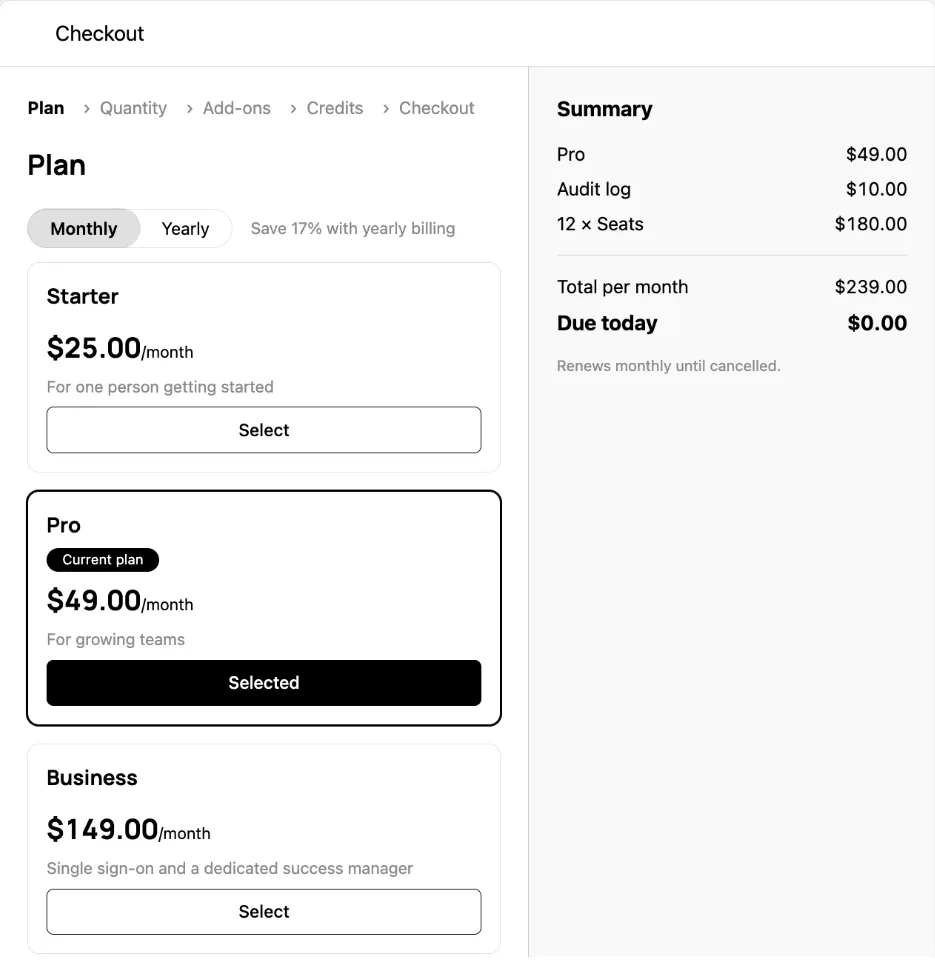
A purchase in a dialog: the plan and its billing period and currency, automatic top-ups, pay-in-advance quantities, add-ons and their quantities, credit bundles, then payment. The customer chooses, the server prices every change and says what is wrong with the cart, and the dialog decides only the order the choices are asked in. It reads the catalog and the company through the session on the provider, as described in the Drop-in components overview.
Usage
Nothing loads while the dialog is closed, and every opening starts a new cart from selection and what the company has now, so an inline selection object is fine. The dialog calls onOpenChange(false) when the customer closes it and when the purchase completes.
Opening it from anywhere
A page usually opens the checkout from more than one place: a plan card, an over-limit prompt, a “buy more” link. CheckoutLauncherProvider renders one <Checkout /> for the page, and useCheckoutLauncher() below it opens that dialog without holding its state:
open(config) lays each section of config (selection, steps, display, catalogId) over the same section of defaults. The launcher also exposes close() and isOpen. Outside a provider, open does nothing and says so on the console in development. The provider takes every <Checkout /> prop except open, onOpenChange and the config sections, so onComplete and formatProblem sit on it once.
Each drop-in opens the checkout through a handler you pass. Plan Manager, Metered Features, Credit Usage and the Unsubscribe Button show their purchase action only when you pass one, and the Pricing Table calls onSelectPlan with a selection whose checkout field is ready to pass: open({ selection: selection.checkout }).
Props
What the cart starts with
selection names the cart’s starting point; the customer edits from there.
The catalog’s checkout settings in the dashboard decide what the checkout collects beside the card, such as a tax ID, custom fields, an address, email or phone, and whether bundles are bought one at a time.
The steps
The dialog derives its steps from the catalog and the cart, in this order, each only when there is something to choose in it:
- Plan, whenever the catalog sells plans, with the period toggle, a note on what a longer period saves, and the currency choice. A plan the company may not move to says why: the features it is over the limit for, or a downgrade rule, with a link to ask when the catalog names one. A catalog with a custom plan ends the cards with it and a link to ask in place of a price.
- Auto top-up, when the plan has included credits whose top-up the company may set itself.
- Quantity, when the plan has pay-in-advance entitlements.
- Add-ons, when some add-on can be sold with the plan and no trial is starting.
- Add-on quantity, when a chosen add-on has pay-in-advance entitlements.
- Credits, when some bundle is sold with the plan in the cart’s currency.
- Checkout, always: the payment method, promo code, tax ID, custom fields and the agreement.
A trial that needs no card goes from the plan (and its top-ups) to the checkout step. With no plan and some bundles, the purchase is credits alone, and the plan step still shows, unselected, for the customer to pass.
steps.skip passes over the steps it names, except a plan step with no plan to fall back on and any step a blocking problem points at: a refused finalize takes the customer to the first step that can fix it. Skipped steps stay in the step list, where choosing one returns to it, unless steps.hideSkipped. steps.initial opens on a later step; a step the checkout does not have falls back to the first.
Layout
From 768px up, the steps take the left and the summary the right, each scrolling on its own; below that the summary sits under the steps and the action keeps to the bottom of the screen. Three display props change that:
display.currencies lists the currencies to offer, in order, with the first as the default, and display.showCurrencySelector, showPeriodToggle and showBillingDisclaimer hide the controls their names say. Everything else is CSS: the class names below are API, and a stylesheet rendered after <SchematicStyles /> wins at equal specificity.
Problems
Everything the server finds wrong with the cart arrives as a problem with a code, whether it is blocking, a message safe to show, and the ids of what it is about. The dialog shows each problem on the step that can fix it and disables Pay while a blocking one stands; the customer fixes the cart, not the rule. formatProblem substitutes your own words by code, and onProblems reports each new list:
The codes are the CheckoutProblemCode values the Components API reference lists on the checkout responses, such as payment_method_required, selection_invalid for a promotion code the server rejects, usage_over_limit, downgrade_not_permitted and checkout_superseded.
Payment
The checkout pays with the company’s default method on file, and lists any other method on file under it with a Use action. A new card goes through Stripe’s Payment Element on a setup intent, so the checkout step needs @stripe/stripe-js and @stripe/react-stripe-js, the same peers as Payment Methods; they load only when the form opens. A card saved there pays for this checkout and joins the company’s methods on file as the default.
When the charge needs the customer, as with 3-D Secure, the finalize answers with a client secret and the dialog confirms the payment with Stripe before onComplete. A confirmation the customer fails or abandons leaves the checkout completed on the server. The action then reads Confirm payment and retries the confirmation alone, naming the card again because Stripe takes it off a failed intent, and onComplete fires once it goes through.
The tax ID saves on its own, when the field is left and again before a finalize, rather than on the cart. The agreement’s text, when the catalog asks for one, may carry Markdown links, which render as links that open in a new tab; new copy clears the box, because accepting one wording is not accepting another.
Before it can load
GET /catalog/view is gated on the multi-product-catalog flag and the /company reads on company-context-api, both per account; a route behind a flag that is off answers 404, not 403. Without the first, the dialog says checkout is not available; without the second it still sells, without the currency lock and the company’s current quantities. A catalog whose capabilities.checkout is false, because there is no Stripe integration, more than one subscription, or one managed elsewhere, shows the same notice. Ask Schematic to enable either flag for the account.
Theming
The dialog reads the same --schematic-* tokens as every other element, and --schematic-backdrop colors the scrim behind it. Styling and theming has the token list.
The root is schematic-dialog schematic-checkout, or a section.schematic-checkout.schematic-checkout--inline under display.container: "inline". .schematic-checkout__layout carries data-step with the step on screen. Step links carry aria-current="step", data-state (done, current, upcoming) and data-skipped; plan and add-on cards data-selected and data-valid; problems data-code.
Localizing it
The dialog’s copy lives under checkout* keys: checkoutTitle, the step names checkoutStepPlan, checkoutStepAutoTopup, checkoutStepUsage, checkoutStepAddOns, checkoutStepAddOnUsage, checkoutStepCredits and checkoutStepPayment, the actions checkoutNext, checkoutPay, checkoutConfirm and checkoutConfirmPayment, and the checkoutPromo*, checkoutTaxId*, checkoutProration*, checkoutDisclaimer* and checkoutTrial* groups. locale formats every amount and date, so locale="de-DE" renders 1.852,53 $ and a German date, and strings renames one key:
translate on the provider routes every key through your i18n instead. See Localization.
Build it yourself
The dialog is built on useCatalog, useCompany, useCheckout and useTaxIds, with deriveCheckout turning the catalog, cart and checkout into what it shows. Checkout API describes the persisted checkout underneath, and Checkout with Stripe Elements builds the payment step by hand on the same routes.