> If you are setting up, configuring, or answering questions about Schematic, connect the
> Schematic MCP server before working from these pages. It reads and writes plans, features,
> entitlements, and overrides against the real account, so what you report and what you build
> match what actually exists.
>
> The server is at https://api.schematichq.com/mcp
>
> From Claude, ChatGPT, or another chat assistant, add it as a custom connector:
> https://docs.schematichq.com/working-with-ai
>
> From a coding assistant such as Claude Code, Codex, or Cursor:
> https://docs.schematichq.com/building-with-ai
>
> For clean Markdown of any page, append `.md` to the page URL. For a complete page index,
> see https://docs.schematichq.com/llms.txt
# Metered Features
> The company's usage of each event- or trait-based feature, a card each. Usage against the limit, what it costs, and who on the team used it.
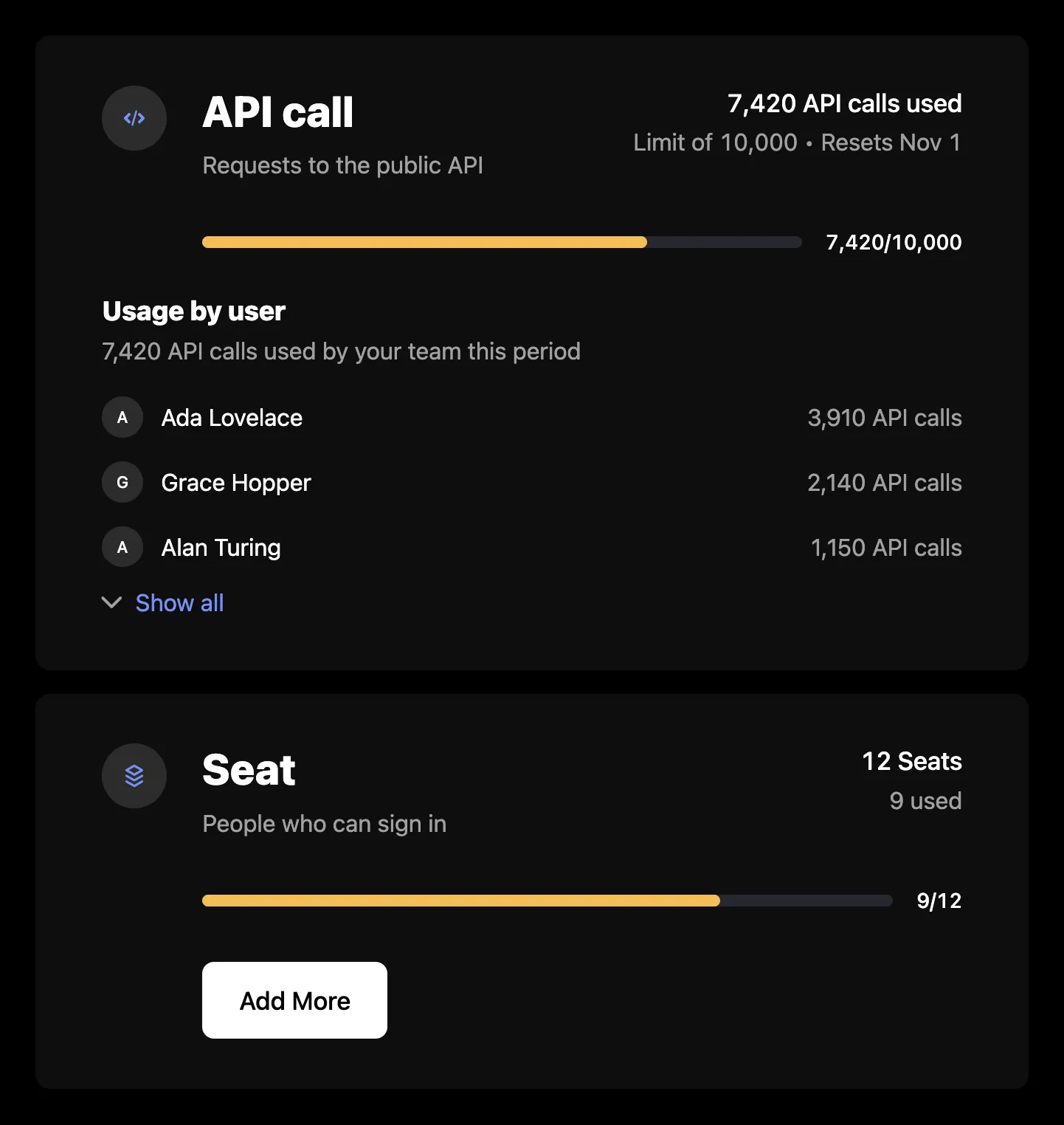
`MeteredFeatures` renders a card for each of the signed-in company's event- and trait-based features: what it has used against its limit, what that costs, when usage resets, and who on the team used it. The cards load from the company billing API, so they need a `session` on the provider as described in the [Drop-in components overview](/components/drop-in/overview#the-session).
## Usage
```tsx
import { SchematicProvider } from "@schematichq/schematic-react";
import {
MeteredFeatures,
SchematicStyles,
} from "@schematichq/schematic-components/elements";
;
```
## Props
| Prop | Default | Effect |
| ----------------------------- | ------- | ---------------------------------------------------------------------------------------------------------------------------------------------------- |
| `showHeader` | `false` | The "Usage" heading above the cards. |
| `showIcon` | `true` | Each feature's icon. The circle holds its place even when the feature has none. |
| `showDescription` | `true` | Each feature's description. |
| `showUsage` | `true` | The headline: what is used, or the quantity paid for. |
| `showAllocation` | `true` | The limit line and when usage resets. |
| `showMeter` | `true` | The usage meter. |
| `showUsageByUser` | `true` | The breakdown by user, for event-based features. |
| `visibleFeatures` | | Feature ids to show, in this order. Every metered feature shows when it is absent. |
| `showCredits` | `true` | The "credits per use" line on credit-burning features. |
| `showHardLimit` | `false` | An info tip with the hard limit on features billed past it. |
| `showWarningThresholdAsLimit` | `false` | The warning threshold in place of the limit, where one is set. |
| `onAddMore` | | "Add More" calls this with the feature's `FeatureUsage` row. |
| `addMoreUrl`, `addMoreTarget` | | "Add More" links here when there is no `onAddMore`. |
| `headingLevel` | `2` | The heading's level, `1` through `6`. Each feature's name sits one level below while the heading shows, and takes the level itself when it does not. |
| `className` | | Added to the root alongside `schematic-element schematic-metered-features`. |
| `locale` | | BCP 47 tag for number, currency, and date formatting. Falls back to the provider's `locale`, then the viewer's language. |
| `strings` | | Copy for this component by key. Wins over the provider's `strings` and `translate`. |
A company with no event- or trait-based feature renders nothing.
## How each card reads
The headline says what is used, such as "1,300 API calls used", or for a feature paid in advance, the quantity bought. The limit line under it depends on the price behavior: "1,000 included" for an overage's soft limit, how much of a paid-in-advance quantity is in use, what pay-as-you-go usage has cost, the tier's ceiling, a credit-burning feature's credits per use, "Limit of 1,000", or "No limit". When the usage metric resets, "Resets Oct 1" follows it.
The meter fills by the share of the limit used. Its `data-tone` is `ok`, then `warning` from 60% and `critical` from 80%. Tiered features use the `tier` tone, and an overage feature switches to `overage` once usage passes its soft limit. Pay-as-you-go and credit-burning features have no meter, and neither does a feature with no usage figure or no limit to measure it against. The `1,300/2,000` label beside the meter is left out when the limit is zero.
An overage feature carries a footer with the price past the soft limit and what the usage beyond it costs. A tiered feature's footer names the current tier, with a tooltip listing every tier's price.
## Add More
"Add More" shows on a feature paid for in advance, and only when you give it somewhere to go with `onAddMore` or `addMoreUrl`. The component has no checkout of its own, so the button reaches whatever purchase flow you point it at.
## Usage by user
Each event-based feature lists who on the team used it this period, heaviest first, with the team's total. It shows three people, then expands to the top 20 and reports the rest as a count. Usage sent without a user appears as "Unattributed" once the list is expanded. When this list fails to load, it shows its own message and "Try again" and the rest of the card stays.
## Errors
A failure with nothing to show replaces the content with a short message and a "Try again" button. A 404 reads "Usage is not available for this account.", because that status means the account is not enabled for the company billing endpoints. Every other failure, and a 404 under usage already loaded, reads "There was a problem retrieving your usage." A refetch that fails with usage on screen is reported under it rather than replacing it. In development the component logs the underlying error to the console beside the copy.
## Strings
Every word the component renders resolves through `strings` on the component, then on the provider, then the provider's `translate`, then English. See [Localization](/components/drop-in/localization) for how the chain works. These are the component's own keys:
| Key | Default |
| -------------------------------------------------- | -------------------------------------------------------------------- |
| `meteredFeaturesHeader` | Usage |
| `meteredFeaturesLoading` | Loading usage, read by assistive technology while the skeleton shows |
| `meteredFeaturesError` | There was a problem retrieving your usage. |
| `meteredFeaturesUnavailable` | Usage is not available for this account. |
| `meteredFeaturesUsed` | `{{amount}} {{units}} used` |
| `meteredFeaturesIncluded` | `{{amount}} included` |
| `meteredFeaturesInUse` | `{{amount}} used` |
| `meteredFeaturesLimitOf`, `meteredFeaturesNoLimit` | `Limit of {{amount}}`, No limit |
| `meteredFeaturesAddMore` | Add More |
| `meteredFeaturesAdditional`, `meteredFeaturesTier` | Additional, Tier |
| `retry` | Try again |
The per-user list's keys, shared with [Credit Usage](/components/drop-in/credit-usage):
| Key | Default |
| ----------------------------------------------- | ------------------------------------------------------------------------------------------- |
| `usageByUserHeader` | Usage by user |
| `usageByUserTotal` | `{{amount}} used by your team this period` |
| `usageByUserError` | There was a problem retrieving usage by user. |
| `usageByUserUnattributed` | Unattributed |
| `usageByUserMore` | `plus {{shown}} more` |
| `usageByUserShowTop`, `usageByUserShowAllCount` | `Show top {{shown}} users`, `Show all {{shown}} users`, each with `_one` and `_other` forms |
| `usageByUserShowAll`, `usageByUserShowFewer` | Show all, Show fewer |
The usage lines share `usageUnits`, `usageTierUpTo`, `usageTierUnlimited`, `usagePerUse`, `usageResets`, `usageHardLimitLabel`, `usageHardLimit`, `usageTieredPricingLabel`, `usageTiersVolume`, `usageTiersGraduated`, and the `periodMonthShort`, `periodQuarterShort`, and `periodYearShort` suffixes with [Included Features](/components/drop-in/included-features#strings), and several with [Plan Manager](/components/drop-in/plan-manager) and [Pricing Table](/components/drop-in/pricing-table), so renaming one renames it wherever it appears.
## Markup
This is what the component renders, for a host styling it without `SchematicStyles`. The root carries no card styling of its own; each feature is a `schematic-card`. [Styling and theming](/components/drop-in/styling) lists the shared classes.
```html
Usage
API calls
…
1,300 API calls usedLimit of 2,000 • Resets Oct 1
1,300/2,000
…
Tier: 1–1,000
1–1,000
$0.01/API call
Tiers apply progressively as quantity increases.$10.00
```
An icon that is not a schematic-icons glyph name, such as an emoji, renders as text inside ``. The meter's `warning` tone adds `schematic-meter--warning`, `critical` adds `schematic-meter--over`, and `tier` and `overage` add `schematic-meter--tier` and `schematic-meter--overage`. While loading, the root carries `data-state="pending"` and `aria-busy="true"`, with a visually hidden `schematic-hidden` loading label and a `schematic-skeleton`: a heading bar when `showHeader` is set, then two rows, each with a `name` and a `usage` cell. On a failure with nothing to show, the root carries `data-state="error"` and holds a `schematic-status` row.
## Build it yourself
[`useFeatureUsage`](/components/build-your-own/hooks#usefeatureusage) returns the same rows Included Features reads, so a page showing both makes one request, and `useFeatureUserUsage(featureId)` returns one feature's usage by user. [`deriveMeteredFeatures`](/components/build-your-own/derivations) keeps the event and trait features and turns each into its headline, limit line, reset date, meter, and price details.