> If you are setting up, configuring, or answering questions about Schematic, connect the
> Schematic MCP server before working from these pages. It reads and writes plans, features,
> entitlements, and overrides against the real account, so what you report and what you build
> match what actually exists.
>
> The server is at https://api.schematichq.com/mcp
>
> From Claude, ChatGPT, or another chat assistant, add it as a custom connector:
> https://docs.schematichq.com/working-with-ai
>
> From a coding assistant such as Claude Code, Codex, or Cursor:
> https://docs.schematichq.com/building-with-ai
>
> For clean Markdown of any page, append `.md` to the page URL. For a complete page index,
> see https://docs.schematichq.com/llms.txt
# Invoices
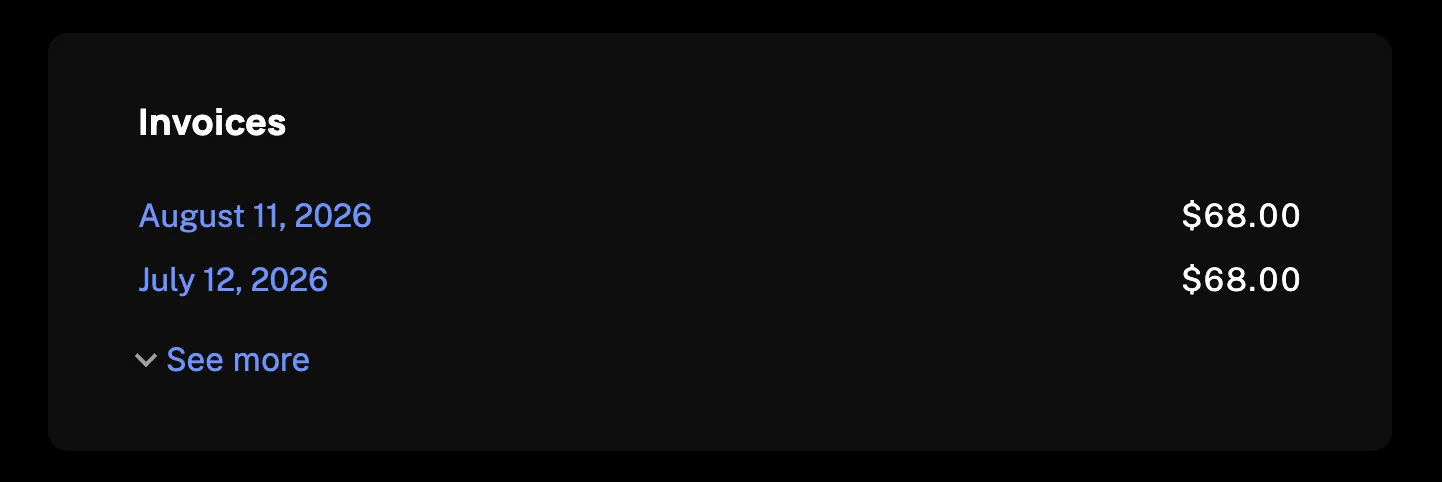
> The company's invoice history as a card. A dated link to each hosted invoice with its amount, and credit notes in parentheses.
`Invoices` renders the signed-in company's invoice history: a dated link to each hosted invoice with its amount beside it. Credit notes appear in parentheses. The card loads from the company billing API, so it needs a `session` on the provider as described in the [Drop-in components overview](/components/drop-in/overview#the-session).
## Usage
```tsx
import { SchematicProvider } from "@schematichq/schematic-react";
import {
Invoices,
SchematicStyles,
} from "@schematichq/schematic-components/elements";
;
```
## Props
| Prop | Default | Effect |
| ------------------------ | ------- | --------------------------------------------------------------------------------------------------------------- |
| `limit` | `10` | Rows shown before "See more". Also sizes the loading skeleton, up to four rows. |
| `collapsible` | `true` | Collapse to `limit` rows behind "See more". |
| `showHeader` | `true` | The "Invoices" heading. |
| `showDate`, `showAmount` | `true` | The date and the amount on each row. |
| `headingLevel` | `2` | The heading's level, `1` through `6`, so the card fits your page's outline. |
| `query` | | Which rows the server returns. `{ includePending: true }` includes unpaid invoices that are not yet due. |
| `className` | | Added to the root alongside `schematic-element schematic-card schematic-invoices`. |
| `locale` | | BCP 47 tag for date and currency formatting. Falls back to the provider's `locale`, then the viewer's language. |
| `strings` | | Copy for this card by key. Wins over the provider's `strings` and `translate`. |
Each distinct `query` is its own list with its own paging, and the component keys by value, so an inline object literal is fine.
Each row with a hosted invoice links its date to it and opens it in a new tab; a row without an `http` or `https` URL shows the date as plain text. The date is the due date, or the created date when the billing provider set none, formatted in the locale's long form such as "March 1, 2026". Every amount carries a tooltip saying whether it was a charge or a credit.
## Paging
The card collapses to `limit` rows and offers "See more". Once every loaded row is showing and the server holds more, "Load more" appears and fetches the next page. The button disables while a page is on the wire, and a page that fails is reported under the list with the rows already fetched left on screen.
## Errors
A failure with nothing to show replaces the card's content with a short message and a "Try again" button. A 404 reads "Invoices are not available for this account.", because that status means the account is not enabled for the company billing endpoints. Every other failure, and a 404 under rows already loaded, reads "There was a problem retrieving your invoices." A refetch that fails with rows on screen is reported under them rather than replacing them.
Neither message is the error's own text. In development the component logs the underlying error to the console beside the copy, so a missing provider or a refused request is diagnosable from the page. In production, read the error from [useInvoices](/components/build-your-own/hooks#useinvoices) if you need it.
## Strings
Every word the card renders resolves through `strings` on the component, then on the provider, then the provider's `translate`, then English. See [Localization](/components/drop-in/localization) for how the chain works. These are the keys:
| Key | Default |
| -------------------------------------------------------- | ----------------------------------------------------------------------- |
| `invoicesHeader` | Invoices |
| `invoicesLoading` | Loading invoices, read by assistive technology while the skeleton shows |
| `invoicesEmpty` | No invoices created yet |
| `invoicesError` | There was a problem retrieving your invoices. |
| `invoicesUnavailable` | Invoices are not available for this account. |
| `invoicesSeeMore`, `invoicesSeeLess`, `invoicesLoadMore` | See more, See less, Load more |
| `invoicesChargeTooltip`, `invoicesCreditTooltip` | The tooltip on a charge's amount and on a credit note's |
| `invoicesUndated` | View invoice, the link text for an invoice with no usable date |
| `retry` | Try again |
```tsx
```
## Markup
This is what the component renders, for a host styling it without `SchematicStyles`. The root's class list is the same in every state, and `data-state` tells them apart. [Styling and theming](/components/drop-in/styling) lists the shared classes.
```html
```
While loading, the root carries `data-state="pending"` and `aria-busy="true"`. It holds a visually hidden `schematic-hidden` span with the loading label and a `schematic-skeleton` shaped like the loaded card: a `schematic-skeleton__heading` bar when `showHeader` is set, and one `schematic-skeleton__cell` per rendered column on each `schematic-skeleton__row`. Each cell names its column on `data-column`, either `date` or `amount`. Rows match `limit`, capped at four.
On a failure with nothing to show, the root carries `data-state="error"` and holds a `schematic-status` row with the message in `schematic-status__message` and a "Try again" button in `schematic-status__retry`.
## Build it yourself
The same data is one hook away. [`useInvoices`](/components/build-your-own/hooks#useinvoices) returns the page and `loadMore`, and [`deriveInvoiceList`](/components/build-your-own/derivations) turns it into rows with formatted text beside every raw value.